Question
Discuss the commands for applying the following formatting concepts to the
document:
i) Auto format
Answer :
Word Count : 315
___ ______ _______ _____ ____ ___ _____ _____ _________ ______ ______ __________.
____ _________ __________ _____ __________ ________ _____ ____.
____ ____ _______ ___ ______ __________ __________ _______ _______ __________ ___ _____.
_____ ________ _______ _______ ____ ________.
________ ____ ________ ____ _________ __________.
__________ ____ ____ ____ ___ ___.
__________ _______ ___ __________ ________ _______ ___ ____ ______.
___ __________ ____ _______ ______ _____ ________ _________ ___ _________.
__________ _______ ____ ________ ______ _______ ________ ________ ___.
________ ________ _________ _______ ____ __________ _______ ______ ___ _____.
________ _____ ______ _________ _____ ____ _______ ________ _________.
____ __________ ___ _____ __________ _____ ___.
______ _______ __________ _____ ____ __________ _________ _________ ___.
____ ________ __________ _____ _________ _________ ___ ______ _______ ____ ______.
______ ____ ____ _________ ___ ______ _____ ____ __________ ____ _________.
_____ ___ __________ _____ __________ _________ ________ _________ ________ _________.
___ _____ ____ _____ __________ ___ ________.
____ _____ ______ ________ ________ _________ ________ _____ ________.
________ ______ ___ _____ ________.
______ ____ ________ ________ ________ _________ _____.
______ _________ ___ ______ ______ __________.
_______ _________ ________ ___ ________ _____ ___ _________ _________ __________.
_____ ____ _____ ________ ________ _________.
Skip in 10
It is very easy if you are using classic menu, just like working with Word 2003/2002/2000. Click the "Format" item on the main menu, you can see the "AutoFormat" item at the bottom.
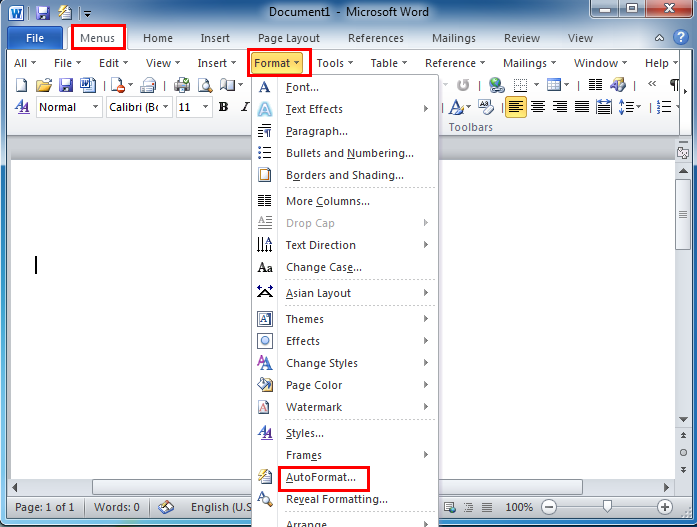
It may be a bit difficult to know where AutoFormat is in Word 2007/2010/2013/2016 if you are not using Classic Menu for Office, but there are still a few ways to find it.
Method A: locate in Proofing
Click the "File" tab and click
____ _________ __________ _____ __________ ________ _____ ____.
____ ____ _______ ___ ______ __________ __________ _______ _______ __________ ___ _____.
_____ ________ _______ _______ ____ ________.
________ ____ ________ ____ _________ __________.
__________ ____ ____ ____ ___ ___.
__________ _______ ___ __________ ________ _______ ___ ____ ______.
___ __________ ____ _______ ______ _____ ________ _________ ___ _________.
__________ _______ ____ ________ ______ _______ ________ ________ ___.
________ ________ _________ _______ ____ __________ _______ ______ ___ _____.
________ _____ ______ _________ _____ ____ _______ ________ _________.
____ __________ ___ _____ __________ _____ ___.
______ _______ __________ _____ ____ __________ _________ _________ ___.
____ ________ __________ _____ _________ _________ ___ ______ _______ ____ ______.
______ ____ ____ _________ ___ ______ _____ ____ __________ ____ _________.
_____ ___ __________ _____ __________ _________ ________ _________ ________ _________.
___ _____ ____ _____ __________ ___ ________.
____ _____ ______ ________ ________ _________ ________ _____ ________.
________ ______ ___ _____ ________.
______ ____ ________ ________ ________ _________ _____.
______ _________ ___ ______ ______ __________.
_______ _________ ________ ___ ________ _____ ___ _________ _________ __________.
_____ ____ _____ ________ ________ _________.
IGNOU ACADEMY
Your IGNOU journey, made easier.
- Solved Assignments
- Study Notes
- Guess Papers
- Question Papers
Continue Reading — It's Free
Sign in with Google to unlock more of this answer.
✓ Free access
✓ Unlock up to 60% of the answer
✓ No payment required
✓ Unlock up to 60% of the answer
✓ No payment required
Quick Google sign-in. No separate registration form.